
Document updated on Oct 9, 2026
MCP Server
The MCP Server feature exposes any of your existing use cases as MCP tools so you can allow to AI MCP Agents to access any of the systems you have already, or create new ones easily, whether it is based on legacy services and data or not.
With the MCP Server of KrakenD, you instantly add MCP to all your stack regardless of their native MCP compatibility or not. This unlocks effortless AI-driven integrations by bridging any service with MCP through declarative configuration.

As KrakenD can expose through MCP any kind of service, you can start offering endless use cases, and is a game changer to start publishing AI services inside enterprise architectures with no effort.
The key concepts of the MCP server are:
- Build on-the-fly MCP servers: Declare and run MCP servers that fetch and send data from and to multiple places.
- Protocol translation: Offer MCP, consume anything. E.g., connect to a SOAP service and offer it to Claude via MCP.
- KrakenD ecosystem compatibility: MCP servers are first-class citizens and enjoy authorization, throttling, data modification, validation, caching, monitoring, workflows and everything else on KrakenD.
- Declarative simplicity: Minimal config additions get powerful AI-optimized APIs in front of any service.
- Multi-tool support: Expose multiple AI tools with individual input/output JSON schemas and workflows per MCP server, including mediatypes like audio and images.
- Stateless or stateful operations: Choose behavior to align with backend semantics, SSE available too.
MCP Server configuration overview
To start serving MCP on KrakenD, two main configuration sections define MCP Servers:
- MCP server declaration (root
extra_configwithai/mcp) - MCP entrypoint configuration (endpoint’s
extra_configwithai/mcp)
MCP Server configuration
The ai/mcp namespace at the root level contains all the configuration related to MCP. In this section you declare the list of servers available to agents, and plug them to specific services.
Here’s a real world configuration example you can test:
{
  "$schema": "https://krakend.io/schema/v2.12/krakend.json",
  "version": 4,
  "extra_config": {
    "ai/mcp": {
      "servers": [
        {
          "instructions": "Provides the current state of city webcams",
          "name": "webcam-status",
          "title": "Webcam tools",
          "version": "1.0.1",
          "tools": [
            {
              "name": "rovaniemi-webcam",
              "title": "Rovaniemi webcam",
              "description": "Get the latest image from the Rovaniemi webcam",
              "type": "image",
              "workflow": {
                "endpoint": "/__mcp/rovaniemi-webcam",
                "output_encoding": "no-op",
                "backend": [
                  {
                    "url_pattern": "/vi/Cp4RRAEgpeU/0.jpg",
                    "host": [
                      "https://img.youtube.com"
                    ]
                  }
                ]
              }
            }
          ]
        }
      ]
    }
  },
  "endpoints": [
    {
      "endpoint": "/mcp",
      "method": "POST",
      "timeout": "10s",
      "backend": [
        {
          "url_pattern": "/ignore",
          "host": [
            "ignore"
          ]
        }
      ],
      "extra_config": {
        "ai/mcp": {
          "server_name": "webcam-status"
        }
      }
    }
  ]
}
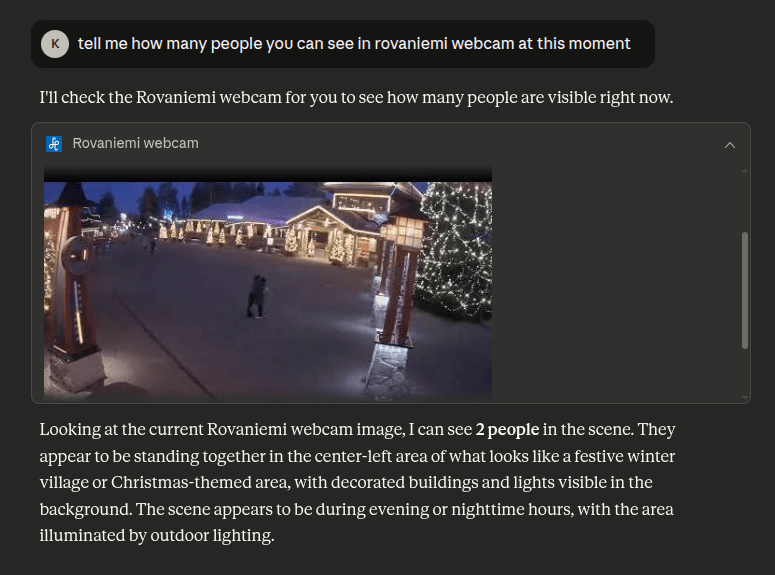
The configuration above will allow you an interaction like this:
The list of available fields is:
Fields of MCP functionality
servers* array of objects- The array of MCP servers available for linking to endpoints. Each object represents a different MCP server. The entry is only the definition of the server. You must create an endpoint that serves as the entrypoint to each server.Each item of servers accepts the following properties:
instructionsstring- The instructions are key for the AI client to understand how to use this server.Defaults to
"" json_responseboolean- Set to true if you want the response to be in JSON format. If set to false, the response will be in SSE format (text/event-stream).Defaults to
false name* string- A unique name for MCP server configuration. This name is an identifier used in the logs or when a title is not provided.Example:
"stories-tracker" ping_periodstring- Krakend will ping all connected clients from time to time to determine if the session must be kept alive. This duration strings sets the ping period KrakenD will do to its connected clients. When you don’t set a value, there is no ping process and KrakenD is unaware of disconnected clients, so it won’t report live notifications.Specify units using
ns(nanoseconds),usorµs(microseconds),ms(milliseconds),s(seconds),m(minutes), orh(hours).Defaults to"0s" statelessboolean- A stateless server does not validate the Mcp-Session-Id header, and uses a temporary session with default initialization parameters. Any server->client request is rejected immediately as there’s no way for the client to respond. Server->Client notifications may reach the client if they are made in the context of an incoming requestDefaults to
false title* string- The description of the purpose of this MCP Server. Provide a meaningful description to help AI understand its use case.Example:
"Story tracker tools" tool_audience_sourceobject- Restricts the tools of this server to the audience of each request. KrakenD reads the audience values from a header, a path param, or both, and exposes only the tools whose
audiencesmatch at least one value. Thetools/listmethod omits the tools that don’t match, and thetools/callmethod rejects calls to them. When you set both sources, KrakenD merges their values.* Required any of: (header_name) , or (param_name)header_namestring- The name of the request header that carries the audience values. The header accepts several values, either repeated or separated by commas.Example:
"X-Role" on_absent_value- Decides which tools KrakenD exposes when the request carries no audience, because the header or param is missing or empty. Use
denyto list no tools and reject every tool call, orallowto list and accept calls to all of them.Possible values are:"deny","allow"Defaults to"deny" param_namestring- The name of the path param in the endpoint URL that carries the audience values, without curly braces. The param accepts several values separated by commas. For instance, an endpoint
/mcp/{filter}usesfilter.Example:"filter"
toolsarray of objects- The Model Context Protocol (MCP) allows servers to expose tools (RFC) that can be invoked by language models. Tools enable models to interact with internal/external systems. Each tool is uniquely identified by a name and includes metadata describing its schema.Each item of tools accepts the following properties:
annotationsobject- Optional behavioral hints about this tool, so AI clients can decide how to use it. These are hints only and are not guaranteed to be enforced.
destructive_hintboolean- Set to true if the tool may perform destructive updates, meaning it can delete or overwrite existing data. Only meaningful when
read_only_hintis false.Defaults tofalse idempotent_hintboolean- Set to true if calling the tool repeatedly with the same arguments has no additional effect beyond the first call. Only meaningful when
read_only_hintis false.Defaults tofalse open_world_hintboolean- Set to true if the tool interacts with an open, external world (for instance a public API or a web search) instead of a closed, well-known set of entities.Defaults to
false read_only_hintboolean- Set to true if the tool does not modify its environment and only reads data.Defaults to
false
audiencesarray of strings- The audiences allowed to list and call this tool when the server sets
tool_audience_source. KrakenD exposes the tool when any request audience matches an entry here, and rejects calls to it otherwise. A*entry matches any audience. description* string- The description of the purpose of this MCP tool. Provide a meaningful description to help AI understand its use case.Example:
"Get a list of open stories in tracker matching a search query" input_headersarray of strings- Defines the list of all headers allowed to reach the backend when passed.
By default, KrakenD won’t pass any header from the client to the backend. This list is case-insensitive. You can declare headers in lowercase, uppercase, or mixed.
An entry["Cookie"]forwards all cookies, and a single star element["*"]as value forwards everything to the backend (it’s safer to avoid this option), including cookies. See headers forwardingDefaults to[] input_schemaobject- The input JSON schema to validate the input parameters sent by the AI client. The schema is essential in most clients to understand how to pass parameters to the MCP server. The schema must be a valid 2020-12 draft JSON Schema object.
name* string- A unique name for MCP tool configuration. This name is an identifier used in the logs or when a title is not provided.Example:
"stories-list" output_schemaobject- The input JSON schema to validate the output parameters sent back to the AI client. The schema must be a valid 2020-12 draft JSON Schema object.
return_error_msgboolean- Set to true if you want the error message to be returned to the AI client. If set to false, the AI client will only receive a generic error message.Defaults to
false title* string- The description of the purpose of this MCP tool. Provide a meaningful text to help AI understand its use case.Example:
"Story list" type- The type of the response media.Possible values are:
"text","audio","image","binary"Defaults to"text" workflow* object- This is the action/pipeline performed by the tool. While you can add a single action to the tool, because actions can be chained and have complex logic, we have called this a workflow, whether is connecting to a single remote service, many, aggreggating, or any other functionality supported by KrakenD. See the Workflow syntax
version* string- The version of the logic behind your MCP Server implementation. This version makes sense to your business and is not linked to anything else.Example:
"0.2.1"
MCP Entrypoint configuration
Finally, you need to provide a door to use the MCP servers you have defined. Endpoints serve as entrypoints, and you declare a route (most vendors use /mcp), and then plug it to the server you have defined above. Make sure to reuse the exact name you wrote in the server definition.
For example:
{ "version": 4,
  "endpoints": [
    {
      "endpoint": "/mcp",
      "method": "POST",
      "timeout": "10s",
      "backend": [
        {
          "url_pattern": "/ignore",
          "host": [
            "ignore"
          ]
        }
      ],
      "extra_config": {
        "ai/mcp": {
          "server_name": "webcam-status"
        }
      }
    },
    {
      "endpoint": "/mcp",
      "method": "DELETE",
      "@comment": "Allows the client to mark the session as deleted to free up memory",
      "backend": [
        {
          "url_pattern": "/ignore",
          "host": [
            "ignore"
          ]
        }
      ],
      "extra_config": {
        "ai/mcp": {
          "server_name": "webcam-status"
        }
      }
    }
  ]
}
Fields of MCP endpoint
server_name*- The MCP server you want to attach to this endpoint. When you add this namespace, the endpoint becomes the MCP server entry point URL. The name used must match the name in the
ai/mcpconfiguration in the root level.Example:"stories-tracker"
You can write any value on the host and url_pattern of your backend, as once you add the ai/mcp these become irrelevant (the endpoint connects to the MCP server you just created). On the timeout make sure to use a value that is suitable for the services you are exposing through MCP.
MCP Server Authorization with OAuth
The MCP authorization protects your MCP servers with the OAuth 2.1 flow that the MCP specification defines, so only authenticated AI agents can list and call your tools. In this flow, KrakenD acts as the resource server: it validates the access token of every MCP request and announces which authorization server issues those tokens. Your existing identity provider (Keycloak, Auth0, Okta, or any other OAuth 2.1 server) keeps the user login and the token issuing.
You don’t need any custom code to make it work. Two built-in features of KrakenD Enterprise cover the whole resource server role:
- The JWT validation on the MCP entrypoint rejects requests without a valid token.
- The static filesystem serves the OAuth 2.0 Protected Resource Metadata (RFC 9728), the document MCP clients read to discover your authorization server.
The following diagram shows how an MCP client connects to a protected MCP server for the first time:
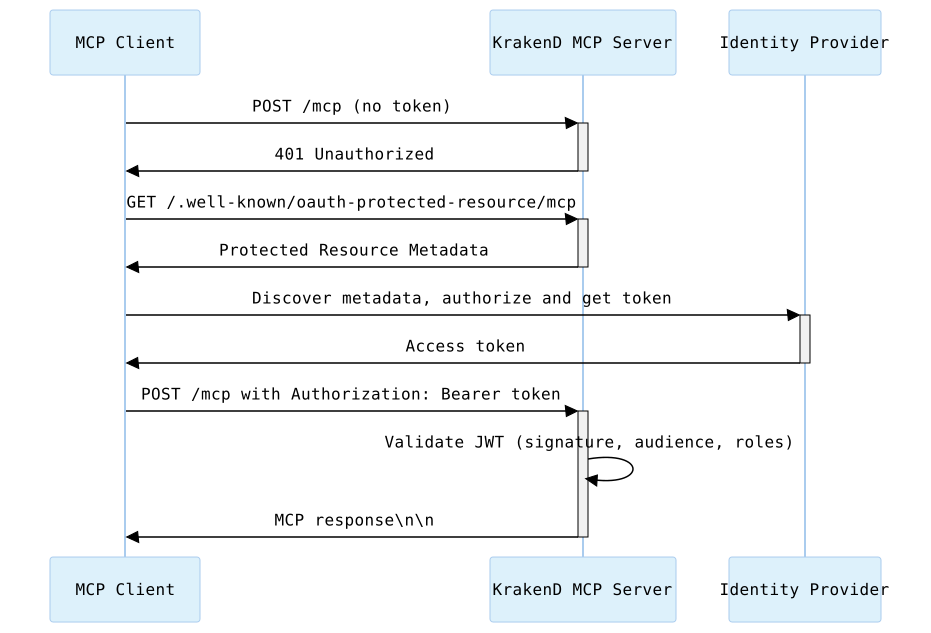
The client sends a first request without a token and receives a 401 Unauthorized. Then it fetches the metadata document from a well-known URL, learns the authorization server, and completes the login there. From then on, it sends the access token in the Authorization: Bearer header of every MCP request, and KrakenD validates it before running any tool.
Protecting the MCP Entrypoint with JWT Validation
To require a token, add the auth/validator namespace to the endpoint that serves as the MCP entrypoint. For example, the following configuration protects the /mcp endpoint with the tokens issued by a Keycloak realm, and only accepts users with the mcp-user role:
{
  "$schema": "https://www.krakend.io/schema/v3.0/krakend.json",
  "version": 4,
  "extra_config": {
    "ai/mcp": {
      "servers": [
        {
          "name": "store-tools",
          "title": "Store tools",
          "version": "1.0.0",
          "instructions": "Provides tools to check the status of the store",
          "tools": [
            {
              "name": "store-status",
              "title": "Store status",
              "description": "Returns the current status of the store",
              "workflow": {
                "endpoint": "/__mcp/store-status",
                "backend": [
                  {
                    "host": ["https://api.example.com"],
                    "url_pattern": "/status"
                  }
                ]
              }
            }
          ]
        }
      ]
    }
  },
  "endpoints": [
    {
      "endpoint": "/mcp",
      "method": "POST",
      "timeout": "10s",
      "backend": [
        {
          "url_pattern": "/ignore",
          "host": ["ignore"]
        }
      ],
      "extra_config": {
        "ai/mcp": {
          "server_name": "store-tools"
        },
        "auth/validator": {
          "alg": "RS256",
          "jwk_url": "https://idp.example.com/realms/krakend/protocol/openid-connect/certs",
          "issuer": "https://idp.example.com/realms/krakend",
          "audience": ["https://mcp.example.com/mcp"],
          "roles_key": "realm_access.roles",
          "roles_key_is_nested": true,
          "roles": ["mcp-user"]
        }
      }
    }
  ]
}
KrakenD checks the signature of the token against the jwk_url of your identity provider, its issuer, its audience, and its roles. Requests with a missing, expired, or invalid token get a 401 Unauthorized, which is the response that starts the OAuth flow on the MCP client. Valid tokens that lack the mcp-user role get a 403 Forbidden.
The MCP specification requires the MCP server to accept only the tokens issued for it, so set the audience to the public URL of your MCP endpoint and configure your identity provider to include it in the aud claim. This prevents agents from reusing tokens issued for other services. You can combine this validation with the tool filtering below, for instance by propagating a claim as the header that sets the audience of the tools.
Announcing the Authorization Server with Protected Resource Metadata
MCP clients need to know which authorization server issues the tokens for your MCP server. The specification offers two discovery mechanisms, a resource_metadata parameter in the WWW-Authenticate header of the 401 response, or a document served on a well-known URL. MCP clients must support both, so serving the well-known URL is enough.
The well-known URL inserts /.well-known/oauth-protected-resource before the path of the MCP endpoint. For an MCP server on https://mcp.example.com/mcp, the client requests https://mcp.example.com/.well-known/oauth-protected-resource/mcp, and when it does not exist, falls back to https://mcp.example.com/.well-known/oauth-protected-resource.
To serve the document from KrakenD, add a wildcard endpoint with a backend/static-filesystem backend to the endpoints list of the previous example:
{
  "endpoint": "/.well-known/*",
  "method": "GET",
  "output_encoding": "no-op",
  "backend": [
    {
      "url_pattern": "/",
      "host": ["http://ignore"],
      "extra_config": {
        "backend/static-filesystem": {
          "path": "/etc/krakend/well_known"
        }
      }
    }
  ]
}
Then save the metadata document in the file /etc/krakend/well_known/oauth-protected-resource/mcp. The path of the file under the path directory matches the path of the request after /.well-known/, so a single endpoint serves the metadata of all your MCP servers. Its content looks like this:
{
  "resource": "https://mcp.example.com/mcp",
  "authorization_servers": ["https://idp.example.com/realms/krakend"],
  "bearer_methods_supported": ["header"],
  "scopes_supported": ["openid", "roles"]
}
The resource is the public URL of your MCP endpoint and must match the audience you validate. The authorization_servers lists the issuers the client can use to get a token, and the client discovers their login and token endpoints from their own metadata. The scopes_supported tells the client which scopes to request during the login.
Example: MCP Authorization in a Real Use Case
The examples repository contains a full stack showcasing MCP authorization at work. It runs KrakenD with a Keycloak identity provider and an nginx proxy that terminates TLS with self-signed certificates, so you can connect a real MCP client like Claude Code to a protected MCP server.
MCP Tool Filtering by Audience
The tool filtering restricts the tools an MCP server exposes according to the audience of each request. Instead of declaring a separate MCP server for every type of consumer, you declare one server with all its tools, tag each tool with the audiences allowed to use it, and tell KrakenD where to read the audience of the request. Use it when the same MCP server serves different profiles, such as administrators, support agents, or developers, and each one must see only the tools that belong to them.
KrakenD applies the filter to the two MCP methods that deal with tools:
tools/listomits the tools that do not match the request audience, so the AI agent never learns they exist.tools/callrejects calls to the tools that do not match, even when the client knows their name.
To enable the filtering, add tool_audience_source to the server declaration and audiences to each tool. For example, the following configuration declares a server with three tools for different audiences, reading the audience from the X-Role header:
{
  "$schema": "https://www.krakend.io/schema/v3.0/krakend.json",
  "version": 4,
  "extra_config": {
    "ai/mcp": {
      "servers": [
        {
          "name": "store-tools",
          "title": "Store tools",
          "version": "1.0.0",
          "instructions": "Provides tools to check the status of the store and manage orders",
          "json_response": true,
          "tool_audience_source": {
            "header_name": "X-Role",
            "on_absent_value": "deny"
          },
          "tools": [
            {
              "name": "list-orders",
              "title": "List orders",
              "description": "Lists the latest orders of the store",
              "audiences": ["support", "admin"],
              "workflow": {
                "endpoint": "/__mcp/list-orders",
                "backend": [
                  {
                    "host": ["https://api.example.com"],
                    "url_pattern": "/orders"
                  }
                ]
              }
            },
            {
              "name": "refund-order",
              "title": "Refund order",
              "description": "Refunds the last order of the store",
              "audiences": ["admin"],
              "workflow": {
                "endpoint": "/__mcp/refund-order",
                "backend": [
                  {
                    "host": ["https://api.example.com"],
                    "url_pattern": "/orders/last/refund",
                    "method": "POST"
                  }
                ]
              }
            },
            {
              "name": "store-status",
              "title": "Store status",
              "description": "Returns the current status of the store",
              "audiences": ["*"],
              "workflow": {
                "endpoint": "/__mcp/store-status",
                "backend": [
                  {
                    "host": ["https://api.example.com"],
                    "url_pattern": "/status"
                  }
                ]
              }
            }
          ]
        }
      ]
    }
  },
  "endpoints": [
    {
      "endpoint": "/mcp",
      "method": "POST",
      "timeout": "10s",
      "backend": [
        {
          "url_pattern": "/ignore",
          "host": ["ignore"]
        }
      ],
      "extra_config": {
        "ai/mcp": {
          "server_name": "store-tools"
        }
      }
    }
  ]
}
KrakenD reads the X-Role header of every request and exposes a tool when any of the header values matches an entry in its audiences. The header accepts several values, either repeated or separated by commas, so a single request can carry more than one audience. The * entry in store-status matches any audience, which makes the tool available to every request that carries one.
Audience in the Path
You can read the audience from a path param of the endpoint instead of a header. Set param_name to the name of the param, without curly braces, and declare it in the endpoint URL. The param accepts several values separated by commas.
For instance, the following snippet replaces the tool_audience_source of the previous example:
{
  "tool_audience_source": {
    "param_name": "audience",
    "on_absent_value": "deny"
  }
}
And the endpoint that serves as the entrypoint declares the {audience} param:
{
  "endpoint": "/mcp/{audience}",
  "method": "POST",
  "timeout": "10s",
  "backend": [
    {
      "url_pattern": "/ignore",
      "host": ["ignore"]
    }
  ],
  "extra_config": {
    "ai/mcp": {
      "server_name": "store-tools"
    }
  }
}
An MCP client connecting to /mcp/support gets the tools of the support audience, and one connecting to /mcp/support,admin gets the tools of both. This approach is useful when the MCP client cannot send custom headers, as you can hand each consumer a different URL.
When you set both header_name and param_name, KrakenD merges the values of the two sources and exposes the tools that match any of them.
Behavior When the Audience Is Absent
The on_absent_value field decides what happens when the request carries no audience, because the header or the param is missing or empty:
deny(default): KrakenD lists no tools and rejects every tool call. Choose it when every consumer must identify itself, as an unidentified request gets no access at all.allow: KrakenD lists and accepts calls to all the tools of the server. Choose it when the filtering only narrows down the tools for known audiences, and anonymous consumers can use everything.
Mind that allow exposes every tool, including those restricted to specific audiences. If a tool is sensitive, keep the default deny.